Does Your Website Actually Perform? Here’s How to Check in 60 Seconds

Most business owners have no idea how their website is performing. Not because they don’t care — but because nobody ever showed them how to check.
The good news is that Google provides a free tool that gives you a clear, instant report on your website. It takes 60 seconds and you don’t need any technical knowledge to understand the results.
Here’s how to use it — and what to do if something comes back in the red.
The Tool: Google PageSpeed Insights
Go to pagespeed.web.dev and type in your website address. Hit Analyse and wait about 30 seconds.
You’ll get four scores, each out of 100. Here’s what they mean in plain English.
1. Performance
This measures how fast your website loads. A slow site costs you visitors — research consistently shows that most people will leave a page that takes more than 3 seconds to load. If someone finds your business on Google and your site is slow, they’ll hit the back button and go to your competitor instead.
A score above 90 is excellent. Between 50 and 89 means there’s room for improvement. Below 50 needs attention.
2. Accessibility
This measures how usable your site is for everyone — including people with visual impairments, those using screen readers, or anyone navigating without a mouse. Beyond being the right thing to do, accessibility also affects your Google rankings. A poorly accessible site is harder for Google to read and index properly.
3. Best Practices
This checks whether your site follows modern web standards — things like secure connections, proper image formats, and avoiding outdated code. A low score here can affect trust and security.
4. SEO
This measures how well your site is set up to be found on Google. It checks things like whether your pages have proper titles, descriptions, and structure. You can have the best website in the world — but if this score is low, nobody will find it.
What Do Your Scores Look Like?
Here’s a screenshot of MonoWeb’s own results on desktop.
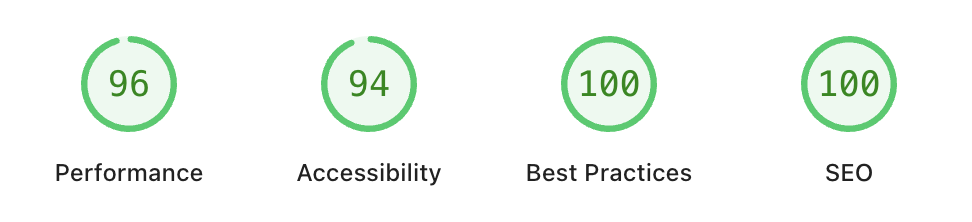
We run this check regularly — on our own site and on every site we build. It’s part of how we make sure the websites we deliver actually do their job.
What to Do If Your Scores Are Low
If you run the test and see amber or red scores, don’t panic. Most issues are fixable. But it’s worth having a conversation with whoever built or manages your site — show them the report and ask what they’re doing about it.
If you don’t have anyone looking after your site, or you’re not getting clear answers, feel free to reach out to us. We’re happy to take a look and give you an honest assessment — no obligation.
Run your free check with this google tool.
More Posts
 Uncategorized
SEO Versus Paid Advertising: What Works Locally?
13 September 2026- Uncategorized
Freelancer Versus Web Agency: Which Fits?
12 September 2026 - 11 September 2026